
Introduction
This post is about setting up a very powerful WordPress stack using the L2MP Stack. I gave a presentation on this topic during a Houston WordPress Meetup and you can see the video below and download the Presentation here.
In addition to the L2MP stack, this post will talk about the amazing performance improvements achieved when using WordPress with a dedicated RDS database engine and REDIS Cache. Additionally, we will cover a three-layer approach to securing your website, starting from the DNS-level up the WordPress level security enhancements.
You can view and download the complete set of slides here.
L2MP Stack – What is it?
If you are familiar with hosting WordPress sites, you know that the basic server requirements for your WordPress to function is commonly called the LAMP stack. This stands for (L)inux, (A)pache, (M)ySQL, and (P)HP.
The L2MP stack is a variation on this but more specifically replacing the Apache and MySQL for better technologies.
Linux
Linux is an open-source Operating System (OS) commonly used to host Web Applications. It is also used by Mainframes and Servers for many types of applications. It is even used by the Mac OS as the underlying operating system.
WordPress runs natively on Linux servers, and you can install this on almost any distro that you choose. The most common Linux distributions for WordPress development are Ubuntu (we will be using 18.04 for this post) and CentOS.
Litespeed Web Server
The Litespeed Web Server is a relatively new proprietary web server technology, but it was initially released in 2003. It is fully compatible with Apache commands, so it can be seamlessly integrated into sites with existing .htaccess commands.
Some of the advantages of the Litespeed Web Server:
- Web Server that is fully compatible with Apache commands.
- Proprietary but has open-source version available (Open Litespeed).
- 4th Most popular with 5.6% usage vs 41.9% Apache, 31% Nginx, 22% IIS.
- Fastest Growing by far.
- View all features here.
Why it’s great
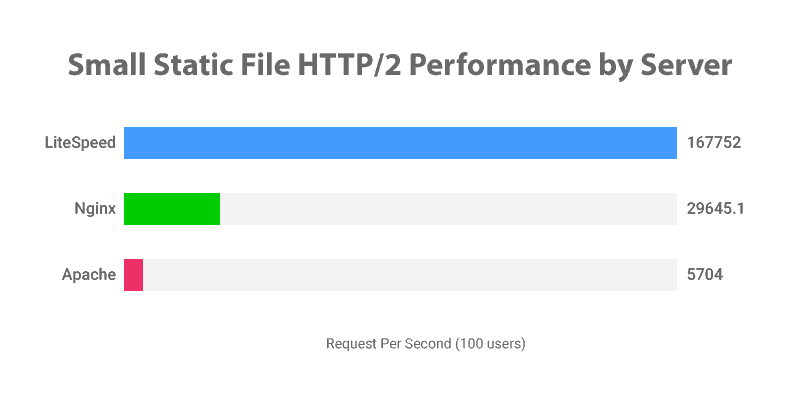
- Capacity – Allows for up to 84X more requests per second when using WordPress and caching vs. Apache using WordPress and caching. Allows for 10X more request/second capacity vs. NGINX.
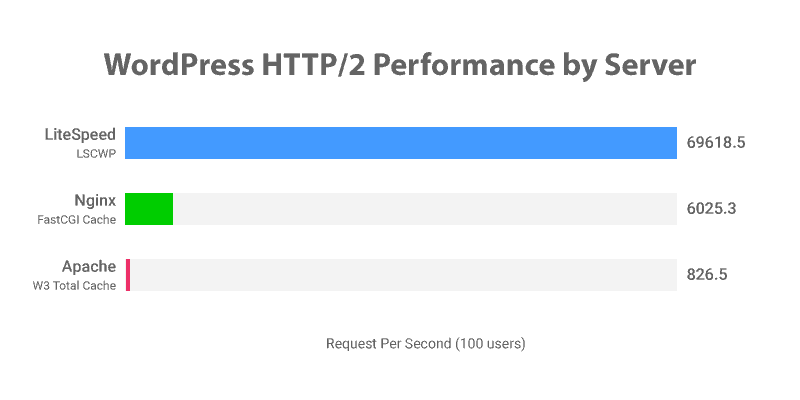
- Website Loading Speed – Up to 29X Faster than Apache web server for static page loading. It is 6X faster than NGINX.
- Security – The Litespeed and Open Litespeed Web Servers offer a large package of security features out of the box. Some of these features include Connection Level Limits which automatically blocks IPs or servers that ask for too many connections at once, Request Checking, Brute-Force Protection for the wp-login page which protects against brute-force attacks specific to WordPress login and xmlrpc pages. Web Application Firewall offers built-in protection against XSS and SQL injection attacks. Support for OWASP and 7th Gen Firewall rules is also automatically included.
You can read about all the security and performance characteristics in the official Litespeed Web Server Page.
MariaDB 10.3 and above (MySQL replacement)
MariaDB is an open-source forked variant of the MySQL Database Engine. It is fully compatible with MySQL commands, which means it can easily be integrated with WordPress installations.
Why MariaDB?
- Open Source – MySQL was originally developed and supported by the Oracle Corporation. In the past, they have supported a number of open-source projects, including many Java libraries. However, in the last few years, they have brought lawsuits against users and commercial implementations of these libraries and API’s. Most notably, against Google. For this reason, the development community has decided to fork the project and make it a 100% GPL project, while actively supporting continuous improvement on the project.
- Speed – MariaDB is much faster than MySQL versions 5.4-5.6. This is due to the fact that it supports leading-edge database technologies like json data type (key-value pair querying and caching) and Dynamic Column support to make querying faster.
You can read more about the advantages of MariaDB here, here and here.
PHP (7.3 and above)
What is PHP?
PHP stands for Hypertext Pre Processor. It’s a scripting language that is very well suited for web applications. Some of the advantages are its ubiquitous compatibility (around 75% of all websites run PHP), WordPress, its themes and plugins are written in PHP.
The PHP we install on the server essentially takes the code from your website and translates that to visible and dynamic content on your website.
I recommend using PHP versions 7.3 and above because they provide security and performance enhancements compared to legacy versions (PHP 5.4 – 5.6).
So this concludes the L2MP stack. Please let me know if you have any questions regarding this powerful stack.
RDS Database Server
What is RDS?
RDS, which stands for “Relational Database Service,” is a cloud service offered by Amazon Web Services that run databases on the cloud. In a traditional server, the web-server, PHP, and database are all run from the same server using the same resources and limitations. Since a large number of page requests, PHP functions, and even database queries can cause your server or allocated server space if on a shared environment, to crash. RDS offloads the database workload to a separate instance that is dedicated and optimized to execute database functions. This allows for your application to allocate more resources to run PHP scripts and web server requests.
RDS is fully compatible with most Database engines like MySQL, MariaDB, Postgre, PerconaDB, and MongoDB. Here is a quick snapshot of some of the performance gains of a database running on an EC2 server vs. an RDS instance:
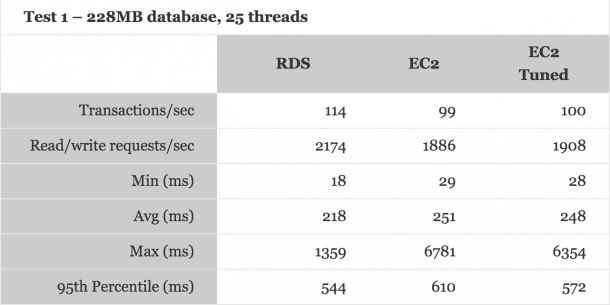
The results of these tests show two things:
- Running an RDS instance show remarkable improvement in database speed, especially considering the max query time (1.3 seconds vs 6.8 seconds for EC2).
- In addition to the time saved by processing database queries faster, the EC2 instance also has time process additional web server and PHP requests (if necessary).
Lastly, the last, and arguably one of the best features of RDS, is not having to deal with database maintenance and backups. AWS does this automatically which saves time and effort maintaining and troubleshooting database issues. If you were to have any fatal database errors, you can roll back the database to any point in time (8-day retention by default) with just a couple of clicks.
REDIS
What is Redis?
Redis is an In-Memory database-caching software project that creates easy to read key-value pairs of the most common database queries. This allows for the system to readily call the most common database information without having to query (search through all the tables) for a piece of information.
Due to the nature of certain web applications, like e-commerce stores or membership sites that are constantly reading to and writing from the database, using Redis caching can result in enormous performance gains.
Below are some charts from a fantastic blog post that compares the performance of SQL vs NoSQL sites and clearly displays the performance improvements under load for each type of CRUD operations:
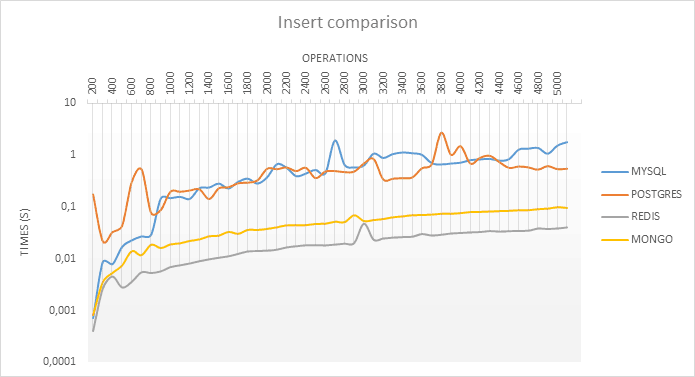
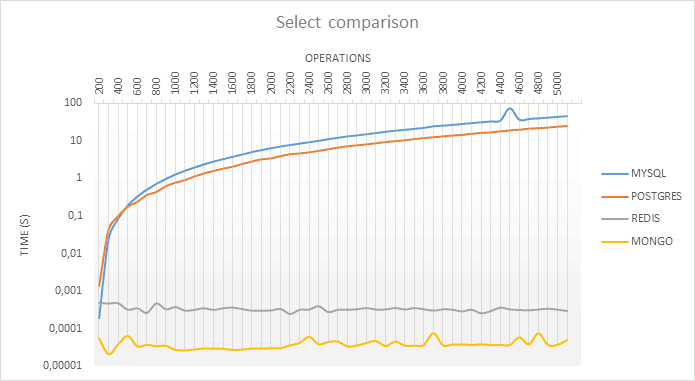
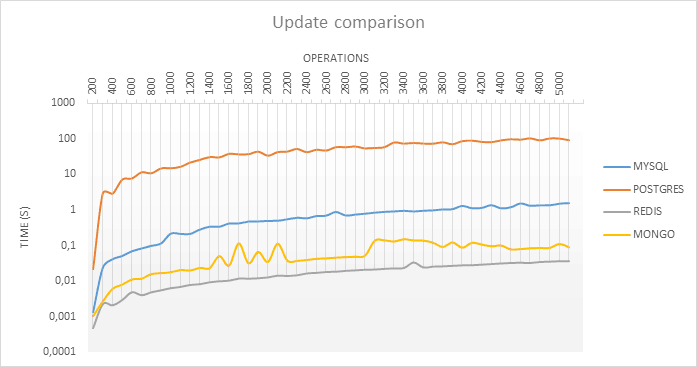
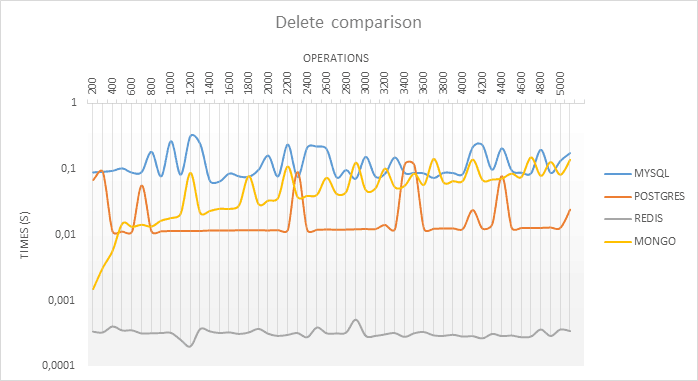
You can read more about Redis caching here and here.
Security
Security is one of the most important topics when discussing WordPress. Unfortunately, due to mass usage and poor security practices, this CMS has gained a reputation as an unsafe framework. Due to the nature of many novice WordPress users, it is also constantly prodded for vulnerabilities and attacked through known exploits. In the next few paragraphs, I will go over some of the basic security measures by layer, that you should take to keep your WordPress site secure. You can read about the security measures I take on the sites I manage in this post.
I like to look at Security on Four different levels: Server (or VPS) Level, Web Server Level, Application Level, and DNS Level.
Server Level
I like to take these security precautions as soon as I create a new installation on a VPS instance.
How to install WordPress on your VPS
- First, I make sure that only the active ports absolutely needed. In most cases, this means port 22 (for ssh access), 80 (http), and 443 (https). Since it is a good security practice to keep your web application server and email server separate, you can keep ports 25, 110, 465, and 587 closed for all inbound traffic.
- Disable root access and password login. It is best to create a user without root-level permission and log in using an SSH private key (blog on this coming soon).
- Set up Iptables, which is the default Linux firewall. This is the first server-level line of defense that blocks malicious commands from being executed on your system. You can read more about the different IPTable rules in this post.
- In addition to IPTables, using Fail2Ban is a great addition to your security toolbox. This software runs on your server and automatically updates your IPTables to lock out any IP address that is attempting to log in unsuccessfully (brute-force). DigitalOcean provides a great article on how to set up Fail2Ban here.
- Lastly, as with most software packages, it is very important to keep your OS updated with the latest packages. This will ensure that the latest security patches are applied and that the OS is optimized for performance. When you log into your server, you will see a notice like the one displayed in the image below.
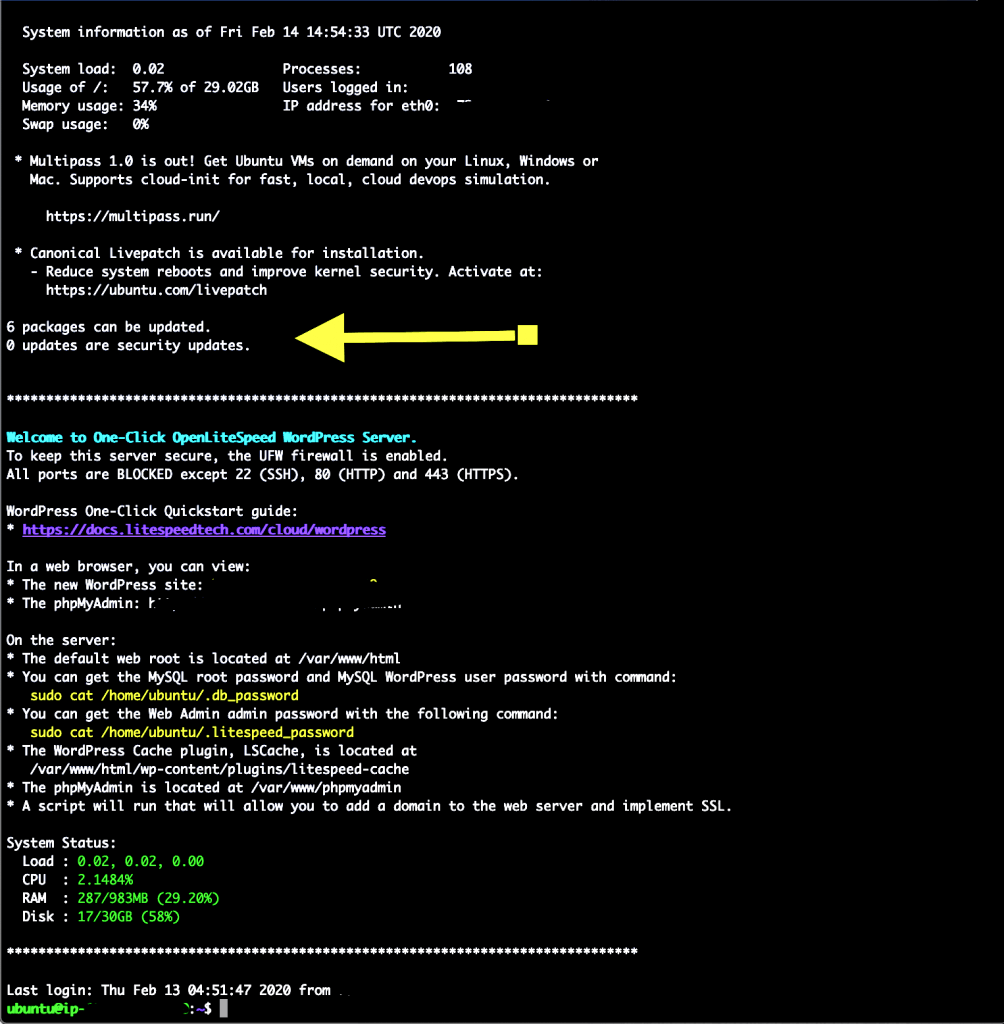
To update the server and apply the latest upgrades, you can run the following commands (In Debian/Ubuntu distros):
sudo apt-get update && sudo apt-get upgradeOnce the updates are applied, you may need to restart the server by running the following command:
sudo shutdown -r nowThere are more security and tools available to harden your servers, but implementing these should be a great starting place.
Web Server Level
Once a request gets past the server-level firewall, it is processed by the web-server to display the content requested. This is where Litespeed Web Server has a huge advantage over other web servers. Some of the advantages include:
- Built-in WordPress security that protects against brute-force attacks on the wp-login.php and xmlrpc.php pages.
- Connection-Level limits.
- Request Checking to deny file and resource exposure.
- Web Application Firewall that prevents XSS and SQL Injection attacks.
- External Application Firewall to protect against DOS attacks that try to overwhelm the server by caching requests and sending them only when the last request is completed.
- CGI Consumption Limit.
- Recaptcha support at the server level.

You can see all the security features in detail that Litespeed Web Server offers by checking out the home page.
Application-Level Security
Application-level security refers to the security measures that are software-based on top of the Operating System. Since this post is about the L2MP stack for WordPress, I’ll focus on the best security practices to apply to WordPress installations.
- Malware scanning – alerts you if your website is compromised by phishing or malware hacks. I personally like to use Malcare and Wordfence Pro.
- I also recommend a free plugin called All In One WP Security and Firewall. This plugin covers a wide range of security options for your website and allows you to change the login URL.
- Change the login URL from mywebsite.com/wp-admin to a custom and difficult-to-guess name.
- Activate 2nd Factor Authentication (2FA) for your admin-level users.
- Daily or weekly backups offline. I like to use the Updraft Plus premium version plugin to back up my website to my off-site cloud backup server (Dropbox, S3, Onedrive, or Google Drive).
- Update Core WordPress, themes, and plugins daily if possible. If not possible, at least weekly.
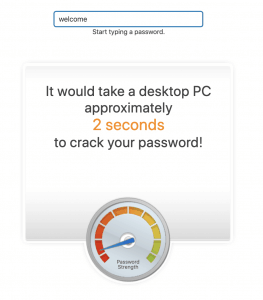
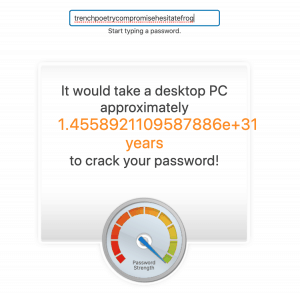
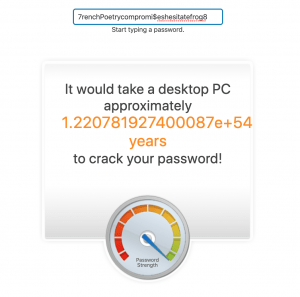
- And last, but definitely not least, keep a very strong password. This is the single most important step you can take to protect your website. I recommend using a secure password manager like Bitwarden, which will sync across your devices and keep your passwords secure.
DNS-Level Security
There are several DNS-level security options that you can apply to your website, which helps protect your website before it even reaches your server. It works by filtering your traffic requests through the DNS system, and blocking unwanted and malicious traffic. Some of these services include Cloudflare and AWS WAF and Shield. Cloudflare has the additional benefit of providing a Content Delivery Network (CDN) service for the cached static files. Below is an image of how Cloudflare
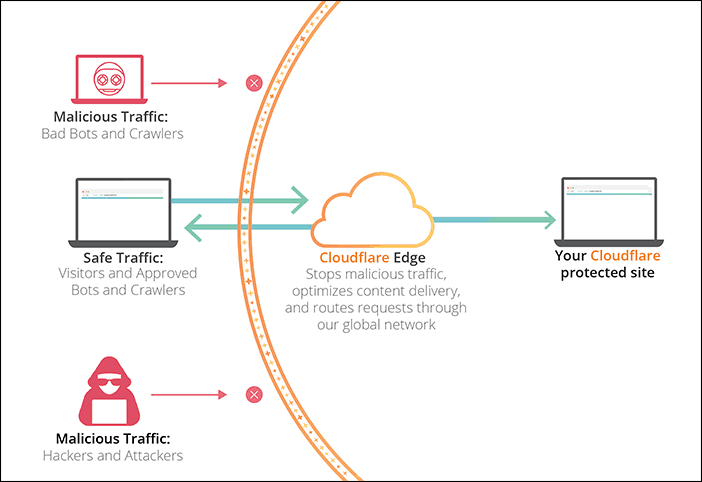
The advantage that these DNS-Level security features have is that you can create custom traffic rules for incoming connections, like country blocking and throttling requests that require too many resources. You can read all about how Cloudflare works on their support page here.
Conclusion
So this post turned out to be a lot longer than I had intended. WordPress is a CMS that is rapidly evolving and integrating new technologies into its ecosystem. For this reason, it’s important to use a stack that I have found to be very powerful, fast, easy to use, and secure. Please let me know if you have any comments or improvements on this post.